Bell Eapen MD, PhD.

Bringing Digital health & Gen AI research to life!

Word to LaTeX: How paperajcli Bridges Two Academic Worlds

Academic writing often lives in two incompatible ecosystems. Microsoft Word is where collaboration happens—tracked changes, inline comments, and committee feedback. LaTeX is where publication happens—precise typesetting, journal templates, and mathematical formatting. Moving between these worlds has traditionally been frustrating, especially when Pandoc alone can’t handle template integration or citation workflows smoothly. As the repository notes, this process “often becomes cumbersome” when using Pandoc directly.

Word to Latex with Paperajcli

Image credit: Petar Milošević, CC BY-SA 4.0 https://creativecommons.org/licenses/by-sa/4.0, via Wikimedia Commons

paperajcli is a lightweight command‑line tool designed to solve this problem. It lets you write collaboratively in Word while producing clean, modular LaTeX files ready for any journal or thesis template. It’s a simple idea with a big impact: mark sections in Word, export them as LaTeX, and drop them into your template with zero fuss.


Why Word and LaTeX Still Need Each Other

Word remains the universal tool for drafting manuscripts with co‑authors, especially those who prefer not to touch LaTeX. It excels at:

  • Commenting and tracking changes
  • Quick edits
  • Committee and multi‑author workflows

LaTeX, on the other hand, is essential for:

  • Journal and thesis templates
  • Bibliography control
  • Mathematical typesetting
  • Figure and table environments
  • Cross‑referencing

The challenge is getting from one world to the other without losing structure, citations, or formatting. paperajcli provides a structured bridge.


What paperajcli Does

The tool works by detecting custom delimiters inside a .docx file and exporting each marked section into its own .tex file. The repository explains that it “exports each marked section into its own LaTeX file” using these delimiters.

Example

If your Word document contains:

<paperaj-introduction>
Introduction text…
</paperaj-introduction>

<paperaj-methods>
Methods text…
</paperaj-methods>

paperajcli produces:

  • introduction.tex
  • methods.tex

as clean, modular LaTeX files.

Headings are preserved—Word’s H1 becomes \section{}, H2 becomes \subsection{}—ensuring your structure remains intact.

These files can then be included in any LaTeX template using:

\input{myfolder/methods.tex}

Native LaTeX Commands Inside Word

One of the most powerful features is that paperajcli preserves LaTeX commands written directly in Word. The repository confirms that commands like \cite{}, \href{}, \ref{}, \label{}, and math environments are “automatically un‑escaped during conversion”.

This means you can write:

“As shown in Figure \ref{fig:architecture}…”

directly in Word, and the LaTeX output will behave exactly as expected.

For citations, the tool is compatible with Zotero and other BibTeX‑based managers. The repository even includes a CSL file to ensure Pandoc citation compatibility.


Figures, Tables, and Cross‑References

Figures and tables are often the hardest part of Word‑to‑LaTeX conversion. paperajcli includes thoughtful post‑processing to make this seamless:

  • Figure captions written as
    Figure 1: Caption text
    are converted into proper LaTeX figure environments.
  • Add TWOCOLUMN in Word to trigger figure* environments.
  • Add LATEXROTATE to generate rotated figures via sidewaysfigure.
  • Cross‑references like Figure_1 or Table_2 are automatically converted to \ref{} commands.

All of these behaviours are documented in the repository’s post‑processing section.


A Clean, Reproducible Workflow

The repository outlines a recommended workflow that blends Word, LaTeX, Zotero, and Overleaf smoothly:

  1. Git Clone a LaTeX template from Overleaf.
  2. Run paperajcli to export Word sections into a directory inside the template.
  3. Insert each .tex file using \input{}.
  4. Manage citations in Zotero and export a .bib file.
  5. Add the .bib file to your project and compile.

This workflow “keeps the collaborative convenience of Word while giving you the precision and template‑compatibility of LaTeX”.


How to Use the CLI

The primary command is:

npx paperajcli latex <input-file> <output-directory>

Arguments

  • file: path to the .docx file
  • outputDir: where .tex files and media will be saved.

Useful Flags

  • --dry-run to preview actions without writing files.
  • --extract-media / --no-extract-media to control image extraction.
  • --help for documentation.

Prerequisites

  • Node.js 18+.
  • Pandoc installed and available in PATH.

Where paperajcli Fits in the Writing Ecosystem

Pandoc

Pandoc is powerful but not template‑aware. It doesn’t split documents into modular sections or preserve custom delimiters. paperajcli adds structure and workflow on top of Pandoc.

Zotero + Better BibTeX

Zotero remains the easiest way to manage references. Exporting a .bib file ensures compatibility with LaTeX citation packages like natbib or biblatex.

Overleaf

Overleaf is the natural destination for collaborative LaTeX editing. With paperajcli, you can maintain a hybrid workflow:

  • Draft in Word
  • Convert with paperajcli
  • Finalize in Overleaf

GitHub + CI

Because paperajcli outputs modular .tex files, it integrates well with:

  • Git version control
  • Automated LaTeX builds
  • Continuous integration pipelines

Real‑World Use Cases

Graduate Theses

Committees often insist on Word drafts. Universities often require LaTeX templates. paperajcli bridges the two without manual rewriting.

Multi‑Author Manuscripts

When co‑authors refuse to use LaTeX, you can still maintain a LaTeX‑based submission pipeline.

Scientific Reports

Figures, tables, and equations survive the transition intact.

Institutional Templates

Many institutions provide rigid LaTeX templates. With paperajcli, you can drop in modular sections without restructuring everything.


Why This Workflow Matters

The academic writing process is rarely linear. Drafts move between collaborators, supervisors, editors, and reviewers. Word is the lingua franca of collaboration; LaTeX is the lingua franca of publication. paperajcli respects both worlds.

It gives researchers:

  • A clean separation between drafting and typesetting
  • A reproducible, template‑friendly workflow
  • A way to preserve citations, math, figures, and structure
  • A modular LaTeX output that plays nicely with Git and Overleaf

It’s a small tool that solves a big, persistent problem.

How DHTI Makes MCP Practical for Healthcare Through “Docktor” (Part IV)

The previous post of this series explained why LLMs need tools, why the agentic pattern matters, and how standards like MCP and A2A make tool‑calling safe and interoperable. But standards alone don’t guarantee usability—especially in healthcare, where clinicians and researchers need systems that “just work.” This is where DHTI steps in, transforming the complexity of MCP into something deployable, maintainable, and clinician‑friendly.

A key part of this transformation is DHTI’s integration with MCPX, a production‑ready gateway for managing MCP servers at scale. MCPX is powerful, but on its own it still requires engineering expertise. DHTI removes that barrier by packaging MCPX inside its own container environment and extending it with a new feature called docktor, which makes installing healthcare algorithms as simple as running a single command.

Let’s unpack how this works.

Image credit: sOER Frank, CC BY 2.0 https://creativecommons.org/licenses/by/2.0, via Wikimedia Commons


What MCPX Is and Why It Matters

MCPX is an open‑source, production‑grade gateway created by Lunar.dev to orchestrate and manage multiple MCP servers. It provides a unified gateway for an entire MCP ecosystem, giving teams centralized control over which tools are exposed to which agents, how they are configured, and how they perform. MCPX acts as an aggregator, meaning it can connect to many MCP servers and present them as a single, coherent interface to an LLM or agent.

Search results also highlight several key capabilities:

  • MCPX dynamically manages multiple MCP servers through simple configuration changes, enabling zero‑code integration with MCP‑compatible services.
  • It centralizes tool discovery, access control, call prioritization, and usage tracking, making it suitable for production‑grade agentic systems.
  • It is designed for environments where the number of tools and servers grows rapidly, providing visibility and governance across all interactions.

In short, MCPX solves the “tool sprawl” problem: instead of wiring dozens of MCP servers manually, you point everything to MCPX and let it orchestrate the rest.

But MCPX is still a developer‑oriented platform. It assumes familiarity with Node.js, configuration files, environment variables, and container orchestration. That’s where DHTI changes the game.


How DHTI Makes MCPX Easy

DHTI embeds MCPX directly into its Docker‑based architecture. Instead of requiring users to install MCPX manually, configure it, and manage its lifecycle, DHTI:

  • Deploys MCPX automatically inside its container environment
  • Configures MCPX to work with DHTI’s FHIR, CDS‑Hooks, and agentic components
  • Exposes MCPX to agents without requiring any user‑side setup
  • Handles the installation of algorithms/calculators packaged as an MCP server with a single command.

For healthcare teams, this is transformative. MCPX becomes invisible infrastructure: powerful, flexible, and standards‑compliant, but never something clinicians need to touch.


Docker‑in‑Docker: Deploying Healthcare Algorithms as Tools

Healthcare algorithms and calculators increasingly ship as Docker containers. This is already common in research environments and many FHIR‑related tools. Docker packaging ensures reproducibility, version control, and portability across systems.

DHTI extends this model by enabling Docker‑in‑Docker deployments inside MCPX. In practice, this means:

  1. A research team packages an algorithm—say, a stroke‑risk calculator or EEG classifier—into a Docker container.
  2. They follow a simple standard:
    • The container must accept a patient ID as input
    • It must be able to access a FHIR server for structured data
    • It must be able to read from a local folder for unstructured data (EEG, radiology images, PDFs, etc.)
  3. DHTI installs this container inside MCPX, where it becomes an MCP tool.
  4. Agents can now call the tool using MCP, passing only the patient ID.

This architecture ensures that algorithms remain isolated, reproducible, and easy to update—just replace the container with a new version.


Why Standards Matter for Healthcare Algorithms

Healthcare algorithms are not arbitrary scripts. They must follow predictable patterns so they can be safely integrated into clinical workflows. The most common requirements include:

  • FHIR server access for structured data such as vitals, labs, medications, and encounters.
    • Many FHIR servers—including Microsoft’s open‑source implementation—run as Docker containers, making them easy to integrate into DHTI’s environment.
  • Local folder access for unstructured data such as EEG files, radiology images, or waveform data.
  • Patient‑ID‑based invocation, which keeps the interface simple and consistent across tools.

By standardizing these expectations, DHTI ensures that any algorithm packaged by a research team can be installed and used by clinicians without custom engineering.


Introducing “Docktor”: One‑Command Installation for Clinicians

The most exciting part of this new architecture is docktor, a DHTI feature that lets clinicians install algorithms with a single command.

Instead of:

  • cloning GitHub repositories
  • configuring environment variables
  • wiring MCP servers manually
  • setting up Docker networks
  • mapping volumes
  • writing MCP configuration files

…a doctor simply runs:

dhti-cli docktor install <algorithm-name>

Behind the scenes, DHTI:

  1. Pulls the Docker image
  2. Deploys it inside MCPX using Docker‑in‑Docker
  3. Registers it as an MCP tool
  4. Grants it access to FHIR and local data folders
  5. Makes it available to agents immediately

The installed algorithm becomes a first‑class MCP tool, callable by any agent in the system.

This is the democratization of GenAI in action: clinicians gain the ability to extend their AI stack without needing a DevOps team.


Seamless Data Access and Agent Output

Once installed, these tools behave like native components of the agentic workflow. An agent can call a tool with:

patient_id: “12345”

The tool retrieves the necessary data from the FHIR server or local folders, runs the algorithm, and returns structured output to the agent. The agent can then:

  • summarize results
  • generate recommendations
  • integrate findings into a CDS‑Hooks card
  • write notes back into the EMR (if permitted)

The entire workflow becomes smooth, modular, and maintainable.


Why This Matters for Healthcare

Healthcare AI has long been held back by deployment friction. Researchers build algorithms, but clinicians struggle to use them. EMR vendors offer APIs, but integrating new tools requires engineering resources most hospitals don’t have.

DHTI + MCPX + docktor changes that equation:

  • Researchers package algorithms as Docker containers
  • DHTI installs them with one command
  • MCPX orchestrates them as standardized MCP tools
  • Agents call them using patient IDs
  • Clinicians get actionable results inside their workflows

This is the missing layer that turns agentic AI from a prototype into a practical clinical platform.


What’s Next

In the next post, I’ll walk through practical examples of docktor in action—how a clinician might install a stroke‑risk calculator, a dermatology classifier, or a genomics pipeline, and how agents use these tools to deliver meaningful clinical insights.

Try the following command today!

npx dhti-cli docktor –help

DHTI: a reference architecture and agent harness for Gen AI in healthcare!
https://github.com/dermatologist/dhti
0 forks.
17 stars.
8 open issues.

Recent commits:

Pragmatic Research That Builds and Travels

I have noticed a steady shift from abstract theorizing toward pragmatic research, resulting in tangible, reusable artifacts across many areas. These artifacts are not just code; they are models, methods, algorithms, datasets, and tools that solve real operational problems. In areas where generative AI is already changing workflows, the value of such pragmatic research is becoming unmistakable.

Image credit: Justmee3001, CC BY-SA 4.0 https://creativecommons.org/licenses/by-sa/4.0, via Wikimedia Commons

Why building matters now

The catalyst is twofold. First, the technical maturity of generative AI and related toolchains has lowered the cost of moving from idea to prototype. Second, health systems and organizations are asking for systems that integrate with workflows and regulatory constraints rather than for more conceptual frameworks. In practice, this means moving upstream in the research lifecycle: designing artifacts with deployability, explainability, and governance in mind, and creating reproducible stacks that others can use.

Open-source availability plays a special role. When models, algorithms, and tools are shared openly, they invite scrutiny, rapid iteration, and safer deployment, especially in high-stakes domains like healthcare, where transparency aids validation and trust. Open artifacts accelerate safe, community-driven improvements and reduce single-vendor lock-in, improving the odds that a research output will see real-world use.

How evaluation and impact change

Traditional academic success metrics emphasize conceptual novelty and citation counts. For pragmatic research, those metrics are necessary but insufficient. The new signals of value include artifact availability, adoption, downloads, forks, integration reports, and even social engagement that indicates uptake and practitioner interest. Empirical evaluation will increasingly combine:

  • Classical metrics from peer review and controlled experiments.
  • Community signals (downloads, GitHub stars/forks, package installs).
  • Operational outcomes (reduced task time, fewer errors, improved throughput).
  • Policy and governance readiness (documentation, auditing hooks, monitoring plans)

As researchers build usable systems, journals and conferences will need to evolve their review criteria to assess reproducibility and real-world applications, not just the strength of theoretical claims.

Sharing, incentives, and scholarly credit

Open-source distribution is central to the pragmatic approach because it enables external validation and iterative refinement. But scholarships must also evolve to reward the labor of engineering, documentation, and maintenance. Practical contributions, well-documented software and model releases, replicable deployment recipes, and usable toolkits should become first-class scholarly outputs. Peer communities should value artifacts that show measurable use in the wild, not just theoretical elegance.

Risks and guardrails

A pragmatic focus raises important risks: rushed or poorly validated tools entering clinical environments, fragile artifacts that break in new settings, and overreliance on usage metrics that can be gamed. Academic conferences and funders must insist on transparency: open validation datasets (where privacy allows), clear documentation of model limitations, and post-deployment evaluation plans.

What this means for MIS and health informatics researchers

For MIS researchers, the pragmatic paradigm reframes scholarship as product plus evidence. Studies should connect organizational processes, human factors, and deployed systems, measuring how an artifact changes decisions, coordination, or resource allocation. For health informatics scholars, the emphasis on safety, explainability, and auditability becomes non-negotiable; artifacts must be designed with clinical oversight, privacy-preserving techniques, and regulatory constraints in mind.

Practically, scholars will benefit from adopting engineering best practices: continuous integration for models, packaged reproducible environments, clear APIs, and user-centered design. Collaboration across disciplinary boundaries, clinical partners, product engineers, ethicists, and implementation scientists will be essential to translate artifacts into impact.

Research that travels

The pragmatic paradigm restores a simple promise: research should travel beyond the page. When MIS and health informatics scholars build artifacts designed for real settings and share them openly, scholarship becomes a living conversation, one of iterative improvements, operational learning, and measurable benefits. Publication will no longer be the last step in the journey; it will be a milestone on the route to adoption, where downloads, forks, deployment stories, and measurable outcomes tell the fuller story of impact. In an era powered by generative AI, the most consequential research will be the kind that people can pick up, run, and improve. Research that travels beyond the lab or paper into real-world settings.

DHTI: a reference architecture and agent harness for Gen AI in healthcare!
https://github.com/dermatologist/dhti
0 forks.
17 stars.
8 open issues.

Recent commits:

IV. DocumentReference hook in CQL execution

The GitHub repository below is a fork of the CQL Execution Framework, which provides a TypeScript/JavaScript library for executing Clinical Quality Language (CQL) artifacts expressed as JSON ELM. The fork introduces an experimental feature supporting LLM-based assertion checking on DocumentReference. The framework enables execution of CQL logic within different data models, such as QDM and FHIR, but does not provide direct support for data models or terminology services. The library implements various features from CQL 1.4 and 1.5 but has some limitations, such as incomplete support for specific datatypes and functions.

Locally hosted LLMs

TL; DR: From my personal experiments (on an 8-year-old, i5 laptop with 16 GB RAM), locally hosted LLMs are extremely useful for many tasks that do not require much model-captured knowledge. 

Image credit: I, Luc Viatour, CC BY-SA 3.0 https://creativecommons.org/licenses/by-sa/3.0, via Wikimedia Commons

The era of relying solely on large language models (LLMs) for all-encompassing knowledge is evolving. As technology advances, the focus shifts towards more specialized and integrated systems. These systems combine the strengths of LLMs with real-time data access, domain-specific expertise, and interactive capabilities. This evolution aims to provide more accurate, context-aware, and up-to-date information, saving us time and addressing the limitations of static model knowledge.

I have started to realize that LLMs are more useful as language assistants who can summarize documents, write discharge summaries, and find relevant information from a patient’s medical record. The last one still has several unsolved limitations, and reliable diagnostic (or other) decision-making is still in the (distant?) future. In short, LLMs are becoming increasingly useful in healthcare as time-saving tools, but they are unlikely to replace us doctors as decision-makers soon. That raises an important question; Do locally hosted LLMs (or even the smaller models) have a role to play? I believe they do! 

Locally hosted large language models (LLMs) offer several key benefits. First, they provide enhanced data privacy and security, as all data remains on your local infrastructure, reducing the risk of breaches and unauthorized access. Second, they allow for greater customization and control over the hardware, software, and data used, enabling more tailored solutions. Additionally, locally hosted LLMs can operate offline, making them valuable in areas with unreliable internet access. Finally, they can reduce latency and potentially lower costs if you already have the necessary hardware. These advantages make locally hosted LLMs an attractive option for many users.  

The accessibility and ease of use offered by modern, user-friendly platforms like OLLAMA are significantly lowering the barriers for individuals seeking technical expertise in self-hosting large language models (LLMs). The availability of a range of open-source models on Hugging Face lowers the barrier even further. 

I have been doing some personal experiments with Ollama (on docker), Microsoft’s phi3: mini (language model) and all-minilm (embedding model), and I must say I am pleasantly surprised by the results! I have been using an 8-year-old, i5 laptop with 16 GB RAM. I have been using it as part of a project for democratizing Gen AI in healthcare, especially for resource-deprived areas (more about it here), and it does a decent job of vectorizing health records and answering questions based on RAG. I also made a helpful personal writing assistant that is RAG-based. I am curious to know if anybody else in my network is doing similar experiments with locally hosted LLMs on personal hardware. 

To or not to LangChain

LangChain is a free and accessible coordination framework for building applications that rely on large language models (LLMs). Although it is widely used, it sometimes receives critiques such as being complex, insecure, unscalable, and hard to maintain. As a novel framework, some of these critiques might be valid, but they might also be a strategy by the dominant LLM actors to regain power from the rebels. 

The well-known machine learning frameworks PyTorch and Tensorflow are from the major players who also own some of the largest and most powerful LLMs in the market. By offering these frameworks for free, they can attract more developers and researchers to use their LLMs and platforms and gain more data and insights from them. They can also shape the standards and norms of the LLM ecosystem and influence the direction of future research and innovation. 

It may not be the case that the major actors are actively trying to discredit LangChain, but some trends are worth noting. A common misconception is that LLM’s shortcomings are due to LangChain. You would often hear about LangChain hallucinating! Another frequent strategy is to confuse the discussion by bringing conflicting terms to the more widely used LangChain vocabulary. SDKs from major actors (deliberately) attempt to substitute their own syntaxes for LangChain’s. 

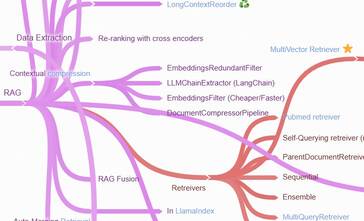
You might be bewildered after a conference run by the main players, and that could be part of their plan to make you dependent on their products. My approach is to use a mind map to keep track of the LLM landscape and refer to that when suggesting LLM solutions. It also helps to have a list of open-source implementations of common patterns.  

Mind map of LLM techniques, methods and tools
LLM Mind map

I have also noticed that the big players are gradually giving up and embarrassing the LangChain paradigms. I feel that despite LangChain’s limitations, it is here to stay! What do you think? 

Named Entity Recognition using LLMs: a cTakes alternative?

TLDR: The targeted distillation method described may be useful for creating an LLM-based cTakes alternative for Named Entity Recognition. However, the recipe is not available yet. 

Image credit: Wikimedia

Named Entity Recognition is essential in clinical documents because it enhances patient safety, supports efficient healthcare workflows, aids in research and analytics, and ensures compliance with regulations. It enables healthcare organizations to harness the valuable information contained in clinical documents for improved patient care and outcomes. 

Though Large Language Models (LLMs) can perform Named Entity Recognition (NER), the capability can be improved by fine-tuning, where you provide the model with input text that contains named entities and their associated labels. The model learns to recognize these entities and classify them into predefined categories. However, as described before fine-tuning Large Language Models (LLMs) is challenging due to the need for substantial, high-quality labelled data, the risk of overfitting on limited datasets, complex hyperparameter tuning, the requirement for computational resources, domain adaptation difficulties, ethical considerations, the interpretability of results, and the necessity of defining appropriate evaluation metrics. 

Targeted distillation of Large Language Models (LLMs) is a process where a smaller model is trained to mimic the behaviour of a larger, pre-trained LLM but only for specific tasks or domains. It distills the essential knowledge of the LLM, making it more efficient and suitable for particular applications, reducing computational demands.  

This paper described targeted distillation with mission-focused instruction tuning to train student models that can excel in a broad application class. The authors present a general recipe for such targeted distillation from LLMs and demonstrate that for open-domain NER. Their recipe may be useful for creating efficient distilled models that can perform NER on clinical documents, a potential alternative to cTakes. Though the authors have open-sourced their generic UniversalNER model, they haven’t released the distillation recipe code yet. 

REF: Zhou, W., Zhang, S., Gu, Y., Chen, M., & Poon, H. (2023). UniversalNER: Targeted Distillation from Large Language Models for Open Named Entity Recognition. ArXiv. /abs/2308.03279 

Distilling LLMs to small task-specific models

Deploying large language models (LLMs) can be difficult because they require a lot of memory and computing power to run efficiently. Companies want to create smaller task-specific LLMs that are cheap and easy to deploy. Such small models may even be more interpretable, an important consideration in healthcare.

Distilling LLMs

Distilling LLMs refers to the process of training a smaller, more efficient model to mimic the behaviour of a larger, more complex LLM. This is done by training the smaller model on the same task as the larger model but using the predictions of the larger model as “soft targets” or guidance during training. The goal of distillation is to transfer the knowledge and capabilities of the larger model to the smaller model, without requiring the same level of computational resources.

Distilling step-by-step is an efficient distillation method proposed by Google that requires less amount of training data. The intuition is that the use of rationale generated by a chain of thought prompting along with labels during training, thereby framing it as multi-task learning, improves distillation performance. We can use ground truth labels or use a teacher LLM to generate the labels and rationale. Ground truth labels are the correct labels for the data, and they are typically obtained from human annotators. The rationale for each label can be generated by using the model to generate a short explanation for why the model predicted that label.

The paper on the method is here and the repository is here. I have converted the code from the original repository into a tool that can be used to distill any seq2seq model into a smaller model based on a generic schema. See the repository below. The original paper uses Google’s T5-v1 model, which is a large-scale language model that was developed by Google. It is part of the T5 (Text-to-Text Transfer Transformer) family of models and is based on the Transformer architecture. You can find more open-source base models for distilling on huggingface. The next plan is to use this method to create a model that can predict the FHIR filter for this repository.

Distilling LLMs step by step!

I will update this post regularly with my findings and notes on distilling models. Also, please check out my post on NLP tools in healthcare.